Containers revolutionized deployment. But they carry baggage: a full Linux userspace, slow cold starts, and megabytes of image data. For some workloads—especially serverless functions and edge computing—this overhead matters.
WebAssembly (Wasm) offers an alternative: millisecond cold starts, tiny binaries, and a sandboxed execution model. And now it runs natively on Kubernetes. This post explains how.
Why Wasm? 
The Container Overhead Problem 
When you start a container, a lot happens:
1. Pull image (if not cached): 100MB-1GB, seconds to minutes
2. Create container: mount layers, set up namespaces
3. Start process: load binaries, initialize runtime
4. Ready to serve: 500ms-5s cold start typical
For a long-running web server, this doesn’t matter. For a serverless function that runs for 50ms, a 2-second cold start is unacceptable.
Wasm: A Different Model 
WebAssembly is a binary instruction format designed for:
- Fast startup: No OS to boot, no libraries to load
- Small size: Compact binary format, often <1MB
- Sandboxed: Capabilities must be explicitly granted
- Portable: Same binary runs anywhere with a Wasm runtime
Container cold start:  500ms - 5s
Wasm cold start:       1ms - 50ms

Container image:       50MB - 1GB
Wasm module:           100KB - 10MB
The Famous Quote 
Solomon Hykes (Docker co-founder), 2019:
“If WASM+WASI existed in 2008, we wouldn’t have needed to create Docker. That’s how important it is. WebAssembly on the server is the future of computing.”
Wasm Fundamentals 
What Wasm Is 
Wasm is a compilation target. You write code in Rust, Go, C, Python, JavaScript, or many other languages, and compile it to .wasm:
// Rust code
fn main() {
    println!("Hello from Wasm!");
}
# Compile to Wasm
cargo build --target wasm32-wasi --release
# Output: target/wasm32-wasi/release/hello.wasm (few hundred KB)
WASI: The System Interface 
Wasm in browsers has no system access. For servers, we need WASI (WebAssembly System Interface)—a standardized API for:
- File system access
- Environment variables
- Command-line arguments
- Random numbers
- Clocks
- Network (emerging)
WASI is capability-based: a Wasm module can only access what the runtime explicitly grants.
# Run with wasmtime, granting file access
wasmtime --dir=/data hello.wasm
The Security Model 
Containers rely on Linux namespaces and cgroups for isolation. A container escape = host access.
Wasm is sandboxed at the instruction level:

A bug in a Wasm module can’t escape the sandbox without a bug in the runtime itself. The attack surface is much smaller than a container.
Wasm Runtimes 
Several runtimes execute Wasm:
| Runtime | Focus | Used By |
|---|---|---|
| wasmtime | Standards compliance, security | Bytecode Alliance, Fermyon |
| wasmer | Performance, versatility | Wasmer Inc |
| WasmEdge | Edge/cloud native | CNCF, second-state |
| wazero | Pure Go, no CGO | Go ecosystem |
For Kubernetes, the runtime is embedded in a containerd shim.
Running Wasm on Kubernetes 
The Architecture 
Kubernetes doesn’t run Wasm directly. The trick: teach containerd to run Wasm modules as if they were containers.

The containerd shim is the key component. It implements containerd’s runtime interface but executes Wasm instead of Linux containers.
RuntimeClass 
Kubernetes uses RuntimeClass to select different container runtimes:
apiVersion: node.k8s.io/v1
kind: RuntimeClass
metadata:
  name: wasmtime
handler: wasmtime  # Matches containerd config
scheduling:
  nodeSelector:
    kubernetes.io/wasm: "true"
Pods specify which runtime to use:
apiVersion: v1
kind: Pod
metadata:
  name: wasm-pod
spec:
  runtimeClassName: wasmtime  # Use Wasm runtime
  containers:
    - name: hello
      image: ghcr.io/example/hello-wasm:latest
      command: ["/hello.wasm"]
containerd Shims 
The runwasi project provides containerd shims for various Wasm runtimes:
# containerd config.toml
[plugins."io.containerd.grpc.v1.cri".containerd.runtimes.wasmtime]
  runtime_type = "io.containerd.wasmtime.v1"

[plugins."io.containerd.grpc.v1.cri".containerd.runtimes.wasmedge]
  runtime_type = "io.containerd.wasmedge.v1"
Available shims:
containerd-shim-wasmtime-v1containerd-shim-wasmedge-v1containerd-shim-wasmer-v1containerd-shim-spin-v2(for Spin framework)
Installing Wasm Support 
Option 1: kwasm-operator (easiest)
# Install kwasm operator
helm install kwasm-operator kwasm/kwasm-operator \
  --namespace kwasm \
  --create-namespace

# Label nodes to install Wasm shims
kubectl label node worker-1 kwasm.sh/kwasm-node=true
Option 2: Manual installation
# On each node
# Download and install shim
curl -LO https://github.com/containerd/runwasi/releases/download/v0.3.0/containerd-shim-wasmtime-v1-linux-amd64.tar.gz
tar xzf containerd-shim-wasmtime-v1-linux-amd64.tar.gz
mv containerd-shim-wasmtime-v1 /usr/local/bin/

# Update containerd config
cat >> /etc/containerd/config.toml << EOF
[plugins."io.containerd.grpc.v1.cri".containerd.runtimes.wasmtime]
  runtime_type = "io.containerd.wasmtime.v1"
EOF

# Restart containerd
systemctl restart containerd
SpinKube: The Serverless Wasm Platform 
SpinKube combines the Spin framework with Kubernetes for serverless Wasm workloads.
What is Spin? 
Spin is a framework for building serverless Wasm applications:
use spin_sdk::http::{Request, Response};
use spin_sdk::http_component;

#[http_component]
fn handle_request(req: Request) -> Response {
    Response::builder()
        .status(200)
        .body(Some("Hello from Spin!".into()))
        .build()
}
# Build and run locally
spin build
spin up
# HTTP server on port 3000
SpinKube Architecture 

Installing SpinKube 
# Install cert-manager (required)
kubectl apply -f https://github.com/cert-manager/cert-manager/releases/download/v1.14.0/cert-manager.yaml

# Install SpinKube (runtime class, shim, operator)
kubectl apply -f https://github.com/spinkube/spin-operator/releases/download/v0.2.0/spin-operator.crds.yaml
kubectl apply -f https://github.com/spinkube/spin-operator/releases/download/v0.2.0/spin-operator.runtime-class.yaml
kubectl apply -f https://github.com/spinkube/spin-operator/releases/download/v0.2.0/spin-operator.shim-executor.yaml
helm install spin-operator oci://ghcr.io/spinkube/charts/spin-operator \
  --namespace spin-operator --create-namespace
Deploying a Spin App 
apiVersion: core.spinoperator.dev/v1alpha1
kind: SpinApp
metadata:
  name: hello-spin
spec:
  image: ghcr.io/spinkube/spin-operator/hello-world:latest
  replicas: 2
  executor: containerd-shim-spin
kubectl apply -f spinapp.yaml

# Service is automatically created
kubectl get svc hello-spin
Spin App Features 
Autoscaling:
apiVersion: core.spinoperator.dev/v1alpha1
kind: SpinApp
metadata:
  name: autoscaled-app
spec:
  image: ghcr.io/example/my-app:latest
  enableAutoscaling: true
  resources:
    limits:
      cpu: 100m
      memory: 128Mi
Variables and secrets:
spec:
  variables:
    - name: API_KEY
      valueFrom:
        secretKeyRef:
          name: my-secret
          key: api-key
Building Wasm Applications 
Rust (Best Support) 
// src/lib.rs
use spin_sdk::http::{Request, Response};
use spin_sdk::http_component;

#[http_component]
fn handle(req: Request) -> anyhow::Result<Response> {
    let path = req.uri().path();
    Ok(Response::builder()
        .status(200)
        .header("content-type", "application/json")
        .body(format!(r#"{{"path": "{}"}}"#, path))
        .build())
}
# spin.toml
spin_manifest_version = 2

[application]
name = "my-app"
version = "0.1.0"

[[trigger.http]]
route = "/..."
component = "my-app"

[component.my-app]
source = "target/wasm32-wasi/release/my_app.wasm"
[component.my-app.build]
command = "cargo build --target wasm32-wasi --release"
Go 
package main

import (
    "fmt"
    "net/http"

    spinhttp "github.com/fermyon/spin/sdk/go/v2/http"
)

func main() {
    spinhttp.Handle(func(w http.ResponseWriter, r *http.Request) {
        w.Header().Set("Content-Type", "application/json")
        fmt.Fprintf(w, `{"message": "Hello from Go!"}`)
    })
}
tinygo build -target=wasi -o main.wasm main.go
JavaScript/TypeScript 
// src/index.js
export async function handler(request, context) {
    return {
        status: 200,
        headers: { "content-type": "application/json" },
        body: JSON.stringify({ message: "Hello from JS!" })
    };
}
Uses the ComponentizeJS toolchain to compile JS to Wasm.
Python 
from spin_sdk.http import simple

class IncomingHandler(simple.IncomingHandler):
    def handle_request(self, request):
        return simple.Response(
            200,
            {"content-type": "application/json"},
            b'{"message": "Hello from Python!"}'
        )
Uses componentize-py under the hood.
Use Cases 
1. Serverless Functions 
The canonical use case. Wasm cold starts are fast enough for per-request scaling:

Compare to container-based serverless: 100ms-2s cold start.
2. Edge Computing 
Wasm’s small footprint suits edge nodes:
| Resource | Container | Wasm |
|---|---|---|
| Memory | 50MB+ | 1-10MB |
| Image size | 100MB+ | 100KB-5MB |
| Startup | 500ms+ | 1-10ms |
Edge nodes might have 1GB RAM. You can run many more Wasm instances than containers.
3. Multi-Tenant Platforms 
Wasm’s sandbox is smaller and safer than containers:
- No kernel vulnerabilities to escape to
- Memory bounds-checked
- Capabilities explicitly granted
Running untrusted user code? Wasm is more defensible than containers.
4. Plugin Systems 
Extend applications safely:

Envoy, Vector, OPA, and others use Wasm for plugins.
5. AI Inference at Edge 
Small models running in Wasm at the edge:
apiVersion: core.spinoperator.dev/v1alpha1
kind: SpinApp
metadata:
  name: inference
spec:
  image: ghcr.io/example/llm-inference:latest
  resources:
    limits:
      memory: 512Mi  # Small model fits in Wasm
No GPU needed for small models; CPU inference with fast cold starts.
Wasm vs Containers: When to Use Which 
Use Wasm When: 
| Scenario | Why Wasm |
|---|---|
| Serverless/FaaS | Cold start matters, per-request scaling |
| Edge computing | Resource constrained, many small workloads |
| Untrusted code | Smaller attack surface, better sandbox |
| Short-lived tasks | Don’t pay container overhead for 50ms work |
| Plugins/extensions | Safe, portable, language-agnostic |
Use Containers When: 
| Scenario | Why Containers |
|---|---|
| Long-running services | Cold start doesn’t matter |
| Full OS needed | Shell, package managers, debugging tools |
| Complex dependencies | Native libraries, databases, etc. |
| Existing workloads | Already containerized, not worth rewriting |
| GPU/hardware access | Wasm hardware support is limited |
| Network-heavy | Wasm networking is still evolving |
The Hybrid Future 
Most clusters will run both:
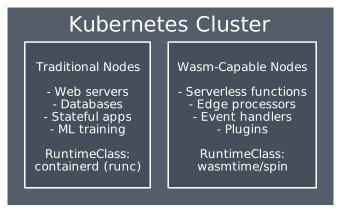
Limitations and Challenges 
WASI is Still Evolving 
WASI 0.2 (current) has limited APIs:
- ✅ Filesystem, environment, clocks
- ✅ HTTP (via wasi-http)
- ⚠️ Sockets (preview)
- ❌ Full POSIX compatibility
Some things don’t compile to Wasm yet.
Language Support Varies 
| Language | Support Level |
|---|---|
| Rust | Excellent |
| Go (TinyGo) | Good, some stdlib missing |
| C/C++ | Good |
| JavaScript | Good (ComponentizeJS) |
| Python | Improving (componentize-py) |
| Java | Experimental |
| .NET | Experimental |
Debugging is Harder 
No shell to exec into. Debugging options:
- Print statements (captured as logs)
- Remote debugging (limited)
- Local testing with Spin
Ecosystem Maturity 
Container ecosystem: millions of images, decades of tooling.
Wasm ecosystem: growing but young. You might need to build things that already exist for containers.
Getting Started 
Local Development 
# Install Spin
curl -fsSL https://developer.fermyon.com/downloads/install.sh | bash

# Create new app
spin new -t http-rust hello-wasm
cd hello-wasm

# Build and run locally
spin build
spin up
# Visit http://localhost:3000
Deploy to Kubernetes 
# Build and push OCI image
spin registry push ghcr.io/myuser/hello-wasm:latest

# Deploy
cat <<EOF | kubectl apply -f -
apiVersion: core.spinoperator.dev/v1alpha1
kind: SpinApp
metadata:
  name: hello-wasm
spec:
  image: ghcr.io/myuser/hello-wasm:latest
  replicas: 1
  executor: containerd-shim-spin
EOF
Summary 
WebAssembly on Kubernetes offers:
| Benefit | Impact |
|---|---|
| Millisecond cold starts | True scale-to-zero, per-request scaling |
| Tiny binaries | Less storage, faster pulls |
| Strong sandbox | Safer than containers for untrusted code |
| Language flexibility | Compile once, run anywhere |
The stack:

Wasm won’t replace containers—but for the right workloads (serverless, edge, plugins, multi-tenant), it’s a compelling alternative with fundamentally better characteristics.
Containers are VMs done right. Wasm is processes done right. Both have their place.